# Setup with ItemsAdder
{% hint style="info" %}
**Requirements**: This method requires [ItemsAdder](https://www.spigotmc.org/resources/%E2%9C%A8itemsadder%E2%AD%90emotes-mobs-items-armors-hud-gui-emojis-blocks-wings-hats-liquids.73355/) to be installed.
{% endhint %}
To add the crate models (static) and keys to your resource pack, follow these steps:
## Step 1:
Find the **elemental\_crates\_itemsadder** folder. Inside, there is the resource pack for the keys and the static version of the crates, the fonts, and the items.
Main Folder
## Step 2:
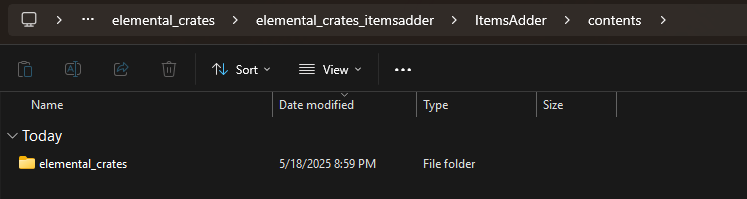
Open the folder, and find the **elemental\_crates** folder inside the contents folder of ItemsAdder.
## Step 3:
Drag and drop the **elemental\_crates** folder to your server's contents folder of ItemsAdder.
## Step 4:
Now make sure to run the **/iazip** command to zip a new resourcepack.
{% hint style="info" %}
\[Optional] Follow, only if you want to import the animated version of the crate by using Model Engine.
{% endhint %}
## Step 5:
Continue with the [Setup with Model Engine](https://wiki.myphoenixstore.com/models/crate-models/elemental-crates/setup-with-model-engine) and follow the ItemsAdder merge installation guide.
.png?alt=media&token=7ce5c181-d689-4ad4-a88a-323a0208ec93)